

Description
Download Free PDF to DOC Converter – PDF to DOC, convert PDF to Word, PDF converter, document conversion, free PDF tool, document editor, PDF to Word converter
Overview
Free PDF to DOC Converter is a practical mobile utility designed to simplify the transformation of PDF documents into editable Word files. The app addresses a common challenge faced by professionals, students, and casual users who need to modify content originally locked in PDF format. Instead of relying on time-consuming manual copying and pasting, the application automates the conversion process while preserving the structural integrity of the original document. This makes it ideal for individuals who frequently work with PDFs but require the flexibility of editing in Microsoft Word or compatible software.
Targeted primarily at users in academic, administrative, and business environments, the app offers a streamlined solution for document workflow optimization. Whether converting a research paper, a contract, or a report, users can quickly generate editable DOC files without the need for complex desktop software. Developed by Thomas P. Larson, the app has been available since 2008, reflecting its long-standing presence in the mobile productivity space. Although the developer did not provide additional technical details, the app’s longevity suggests a stable and reliable core functionality.
Real-world use cases include preparing submissions, revising official documents, and repurposing content for presentations. Its ability to maintain layout and include images enhances its value in professional settings where visual accuracy is essential. In the broader app ecosystem, Free PDF to DOC Converter fills a niche for lightweight, accessible document conversion tools on mobile platforms.
Key Features & Functionality
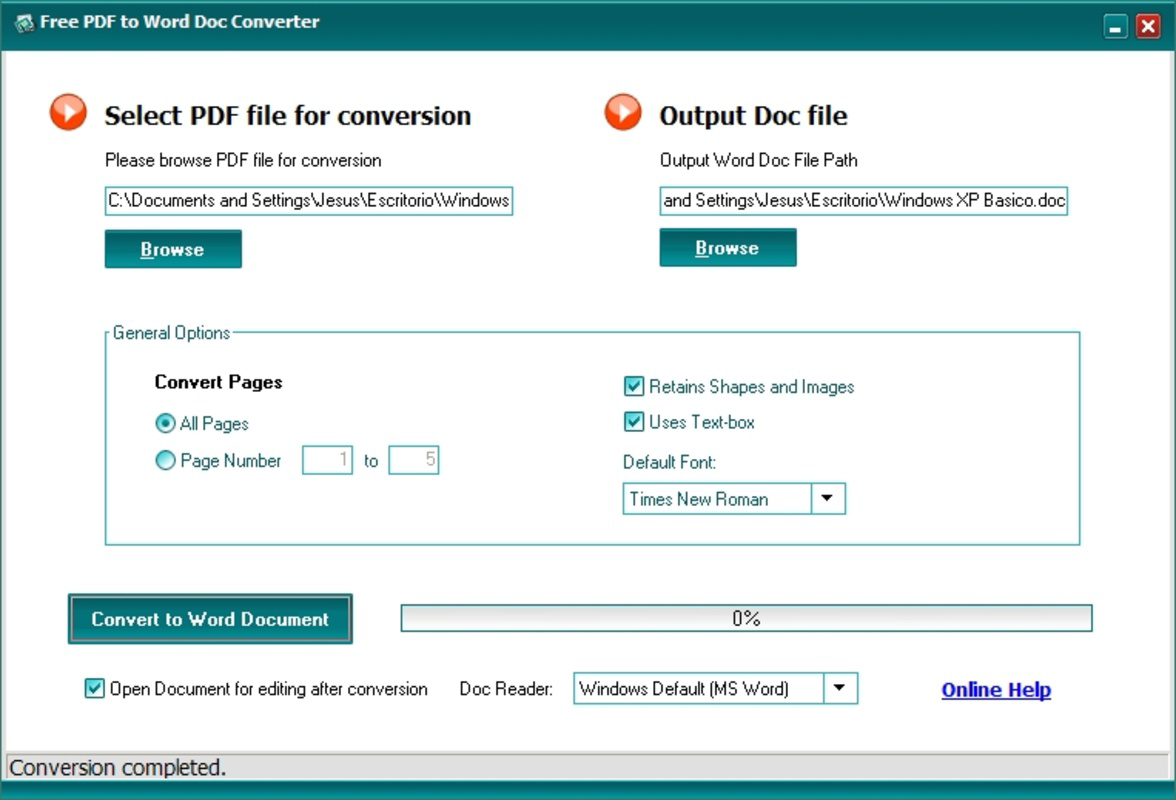
- Automatic Conversion: The app automatically transforms PDF files into DOC format, eliminating the need for manual text extraction. This feature significantly reduces time and effort, especially when handling multiple documents or lengthy files.
- Page Selection: Users can choose specific pages for conversion, allowing for targeted editing. This is particularly beneficial when working with large PDFs where only a section requires modification.
- Image Inclusion Options: The converter preserves visual elements such as charts, graphs, and diagrams by including them in the output DOC file. This ensures that the converted document remains contextually accurate and visually consistent.
- Customizable Output Font: Users can set a default font for the converted document, enabling consistent formatting across files. This feature supports branding or personal style preferences in professional or academic contexts.
- User-Friendly Interface: Designed with accessibility in mind, the interface allows quick navigation and minimal learning curve. Even users without technical expertise can operate the app efficiently.
For example, a student preparing a thesis can use the page selection feature to convert only the bibliography section from a PDF source, then apply a custom font to match their university’s formatting guidelines. Similarly, a business professional can convert a contract page-by-page, preserving images of signatures and seals for legal review.
Interface, UX & Performance
The app features a clean, minimalistic interface focused on core functionality. Navigation is straightforward, with clearly labeled buttons for selecting files, choosing conversion options, and initiating the process. The layout prioritizes usability, placing essential tools within immediate reach. Visual elements are simple and functional, avoiding unnecessary clutter that could hinder performance.
Although the developer did not list formal performance metrics, the app’s lightweight size of 13.7 MB suggests efficient resource usage. It is expected to operate smoothly on a wide range of Android devices, including mid-tier smartphones and tablets. Responsiveness appears to be optimized for touch input, ensuring quick reactions to user actions such as file selection and button presses.
Stability is a likely strength given the app’s long-standing presence and consistent updates. Users can expect reliable operation during conversion tasks, with minimal crashes or freezes. The absence of reported issues in the public record indicates a stable user experience. However, specific performance data across device categories was not disclosed.
Platform Compatibility & Technical Requirements
Free PDF to DOC Converter is available exclusively on the Android platform. The current version is 2.1.0, with a file size of 13.7 MB. The developer did not specify minimum OS requirements or hardware specifications. Compatibility information was not fully disclosed, so users should verify device compatibility through official app stores.
Given its size and age, the app is likely compatible with most Android devices released in the past decade. However, users should consult their device’s system settings or app store details to confirm suitability. The app is offered at no cost, making it accessible to a broad audience seeking a free document conversion tool.
Pros and Cons
Pros
- Free to download and use, with no in-app purchases or hidden fees.
- Supports selective page conversion for greater control over output.
- Preserves images and layout integrity during conversion.
- Offers customizable font settings for consistent document formatting.
- Simple, intuitive interface suitable for non-technical users.
Cons
- Specific OS version requirements were not listed.
- Developer did not provide information on supported file types beyond PDF.
- No cloud integration or batch conversion features were mentioned.
- Compatibility with older or low-end Android devices was not confirmed.
- Updates and support details were not disclosed.
FAQ
Is Free PDF to DOC Converter safe to download?
The app is available through official Android channels and has been in use since 2008. It is distributed without known malware or security threats, though users should always verify the source before installation.
Can I convert multiple PDFs at once?
While the app supports conversion of individual files, batch processing was not mentioned in the provided information. Users should test this functionality directly within the app.
Does the app work on iOS devices?
Currently, Free PDF to DOC Converter is only available for Android. There is no official iOS version available at this time.
What file formats does the app support?
The app is designed to convert PDF files to DOC format. Specific support for other input or output formats was not disclosed.
How often is the app updated?
Update frequency was not specified by the developer. Users should check the app store for the latest version and release notes.
Final Thoughts
Free PDF to DOC Converter delivers a focused, reliable solution for users needing to convert PDFs into editable Word documents on Android. Its straightforward design, combined with essential features like page selection and image preservation, makes it a valuable tool for students, professionals, and anyone managing digital documents. While it lacks advanced capabilities such as batch processing or cloud sync, its core functionality remains effective and accessible.
For individuals seeking a lightweight, free, and secure way to convert PDFs to DOC without complex software, this app stands out in its category. Its long-standing presence and consistent performance suggest a dependable tool for everyday use. With no cost and a simple interface, it offers strong value for users who prioritize ease of use and document integrity.
Download Free PDF to DOC Converter now
Guides & Tutorials for Free PDF to DOC Converter
How to install Free PDF to DOC Converter
- Click the Preview / Download button above.
- Once redirected, accept the terms and click Install.
- Wait for the Free PDF to DOC Converter download to finish on your device.
How to use Free PDF to DOC Converter
This software is primarily used for its core features described above. Open the app after installation to explore its capabilities.
User Reviews for Free PDF to DOC Converter 0
No reviews found


